// Configure your TireNex
Build your system
Tell us your vehicle and how you want to see your tire data — we'll keep every part compatible from there.
- 1 Vehicle
- 2 Core
- 3 View
- 4 ECU
- 4 Display
- 5 Mount
- 6 Sensors
- 7 Tool
- 8 Cables
- 9 Antennas
What are you putting this on?
Pick your vehicle so we can match the right parts. Not sure yet? You can skip this and choose later.
How do you want to see your tire data?
This shapes the rest of your build. You can change it any time.
Which ECU do you have?
Pick your aftermarket ECU / dash so we can match the right CAN setup. Don't see yours? Choose "Not listed" and we'll follow up.
Start with the Core
The receiver that reads your sensors and pushes data to your dash. Every system needs one.
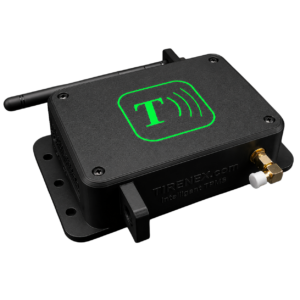
TireNex Core
4-channel receiver · 315 / 433 / BLE · CAN output for Holley EFI dashes.
Pick your sensors
Four sensors per set, one per corner. We've picked the best match for your build — most people are done here.
For the expert enthusiast who is comfortable choosing alternative sensors — either for looks, design, or simply preference.
Reprogramming tool
Your selected sensors determine whether a programming tool is included — nothing to choose here.
Choose your display
This is your TireNex screen — pick the display for your build.
Pick your mount
A display needs a home. Find one made for your exact vehicle.
Cables & harnesses
Add any optional harnesses your install needs. Harnesses already included with your Core or display are marked and don't need to be added.
Antenna
Your system automatically includes the right antenna hardware for your configuration — nothing to choose here.
Review your system
Here's everything in your build. Check it over, then add it all to your cart in one click.